Assembly and operation
Section 1
Game Operation & Test Information
- THE ADDAMS FAMILY (System WPC) ROM Summary
- Pinball Game Assembly Instructions
- Game Play
- Menu System Operation
- Adjustments
- Audits
- Test/Diagnostic Procedures
- Utilities
THE ADDAMS FAMILY (System WPC) ROM Summary
| IC | TYPE | LOCATION | BOARD | PART NUMBER |
|---|---|---|---|---|
| Game ROM | 27020 | U6 | CPU | A-5343-20017-1 |
| Music/Speech ROM | 27040 | U18 | Audio | A-5343-20017-4 |
NOTICE
Order replacement ROMs from your authorized MIDWAY MANUFACTURING CO. distributor. Specify: (1) part number (if available); (2) ROM label color; (3) ROM level (number) on the label; (4) which game the ROM is used in.
PINBALL GAME ASSEMBLY INSTRUCTIONS
THE ADDAMS FAMILY IS A 3 BALL GAME.
| Dimension | Value |
|---|---|
| Weight | 290 Lbs. |
| Width | 26" Approx. |
| Length | 55" Approx. |
| Height | 85" Approx. |
Open the shipping container; remove all cartons, parts, and other items, and set them aside.
Place the cabinet on a support and attach rear legs using leg bolts. Leg levelers and leg bolts are provided among the parts in the cash box.
Attach the front legs (after installing leg levelers), using leg bolts See diagram below..
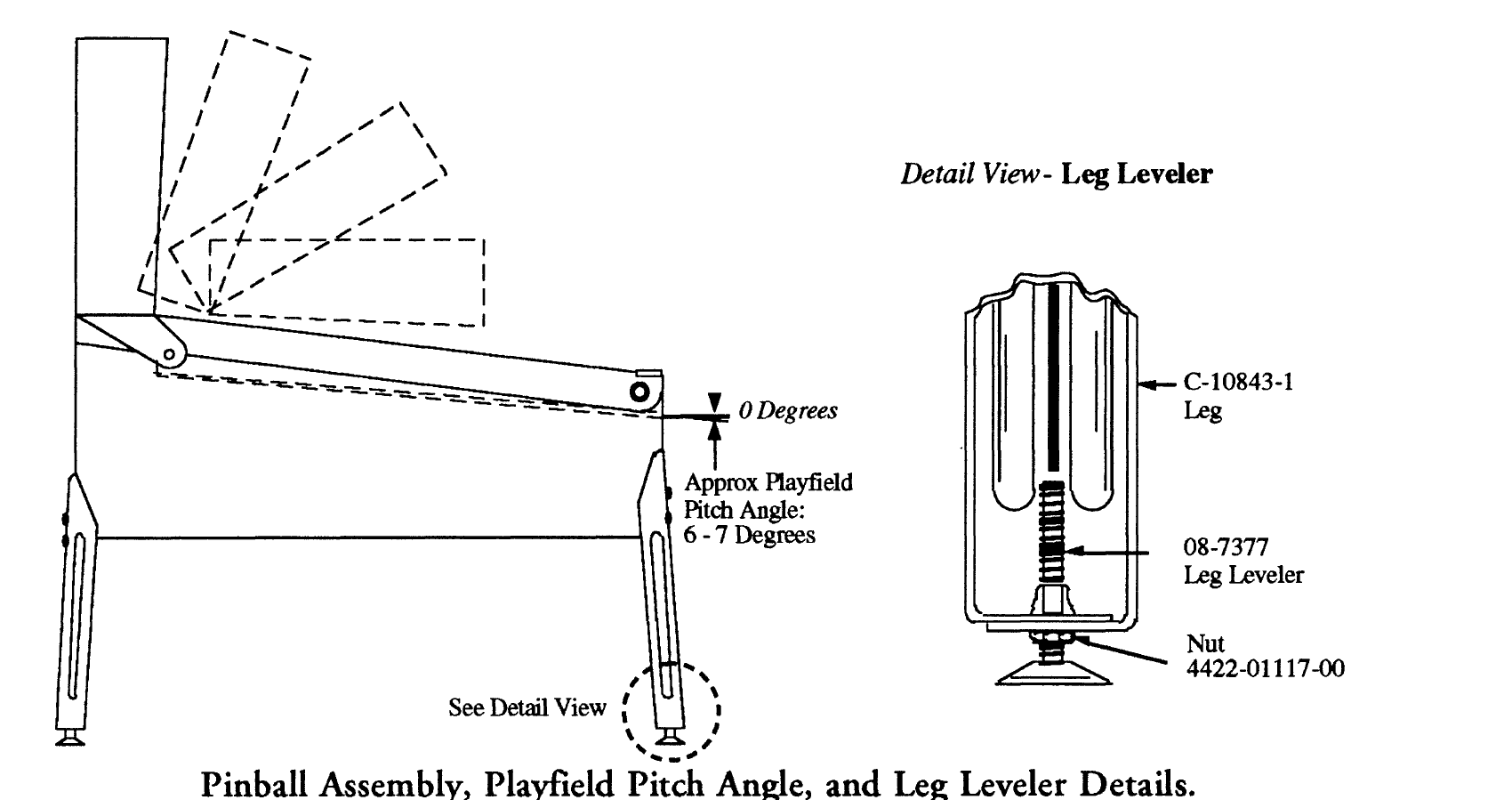
Figure labels:
- 0 Degrees
- Approx Playfield Pitch Angle: 6 - 7 Degrees
- See Detail View
- Detail View - Leg Leveler
| Part Number | Description |
|---|---|
| C-10843-1 | Leg |
| 08-7377 | Leg Leveler |
| 4422-01117-00 | Nut |
- Reach into the cabinet and backbox and ensure that the interconnecting cables are free to move (not kinked or pinched). Be careful to avoid damaging wires at any stage of the assembly process.
⚠ CAUTION
FAILURE TO INSTALL the backbox mounting hardware properly can cause personal injury. NEVER TRANSPORT a pinball game with the hinged backbox erect. Always lower the backbox forward onto the playfield cabinet on a layer of protective material to prevent marring or damage and possible personal injury.
Raise the hinged backbox upright and latch it into position. Unlock the backbox, and remove the backglass, storing it carefully to avoid scratches. Remove the shipping block holding the Insert Board. Unlatch and open the Insert Board. This allows access to the bolt holes used for securing the backbox upright. Install the washer-head mounting bolts through the bottom holes of the backbox into the threaded fasteners in the cabinet to secure the backbox. Close the Insert Board and latch it in position. Reinstall the backglass, and lock the backbox.
Extend each leg leveler slightly below the leg bottom, so that all four foot pads are extended about the same distance. Remove the cabinet from its support and place it on the floor.
Unlock and open the coin door. Locate the Molding Latch Lever, and move the lever toward the left side of the game, to release the Front Molding. Lift the Front Molding off the playfield cover glass return the Latch Lever toward the right, and close the coin door. Carefully slide the glass downward, until it clears the grooves of the Left and Right Side Moldings. Lift the glass up and away from the game, storing it carefully to avoid breakage.
Place a level or an inclinometer on the playfield surface. Adjust the leg levelers for proper playfield level (side-to-side) and playfield pitch angle (incline) of approximately 6-7 degrees. NOTE: It is recommended that these measurements be made ON the playfield, not the cabinet nor the playfield cover glass. Tighten the nut on each leg leveler shaft to maintain this setting, as shown in Figure 3.
CAUTION
Playfield pitch angle adjustments can affect the operation of the plumb bob tilt, inside the cabinet. The plumb bob weight is among the parts in the cash box; the operator should install the weight and adjust this tilt mechanism for proper operation, after completion of the desired playfield pitch angle setting.
Move the game into the desired location; recheck the level and pitch angle of the playfield.
Verify that the required number of balls are installed in the game. THE ADDAMS FAMILY uses 3 balls.
Install playfield mylars if desired.
NOTE: THE ADDAMS FAMILY Diamond Plate™ playfield does not require a protective mylar. However, playfield mylars can be purchased thru your local Bally Distributor. Specify part number 03-7960-20017-1 for full playfield mylar.
Clean and reinstall the playfield cover glass, reversing the procedure of step 7. Prepare the game for player operation.
GAME CONTROL LOCATIONS
Cabinet Switches
The On-Off switch is located on the bottom of the cabinet near the right front leg.
The Start Button is a pushbutton to the left of the coin door on the cabinet exterior. Press the Start button to begin a game, or during the diagnostic mode, to ask for HELP.
Coin Door Switches
The operator controls all game adjustments, obtains bookkeeping information, and diagnoses problems, using only four pushbutton switches mounted on the inside of the coin door. The Coin Door Switches have two modes of operation Normal Function and Test Function.
Normal Function
The Service Credits switch puts credits on the game that are not included in the game audits.
The Volume Up switch raises the sound level of the game. Press and hold the button until the desired level is reached.
The Volume Down switch lowers the sound level of the game. Press and hold the button until the desired level is reached. See Adjustment A.1 28 to shut sound Off completely.
The Begin Test switch starts the Menu System Operation and changes the Coin Door Switches from Normal Function to Test Function.
Test Function
The Escape switch allows you to get out of a menu selection or return to the Attract Mode.
The Up switch allows you to cycle forward through the menu selections or adjustment choices.
The Down switch allows you to cycle backward through the menu selections or adjustment choices.
The Enter switch allows you to get into a menu selection or lock in an adjustment choice.
Coin Door Switches
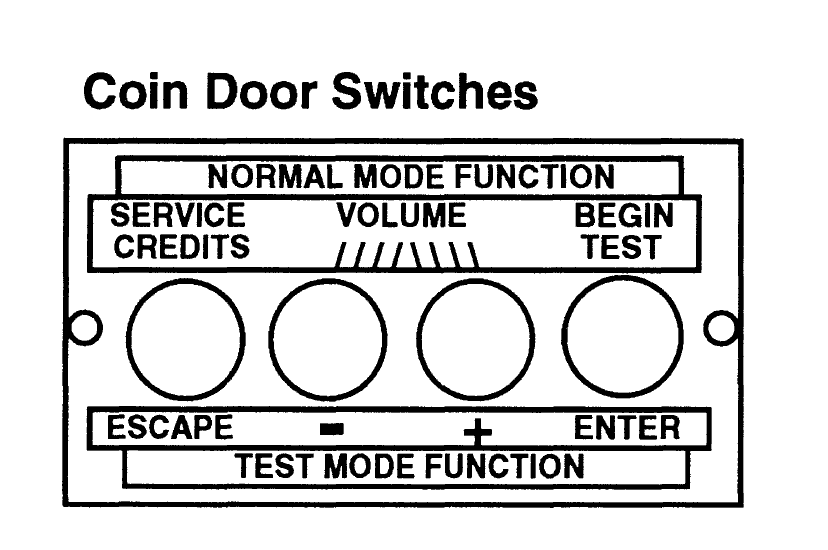
| Button (left to right) | NORMAL MODE FUNCTION | TEST MODE FUNCTION |
|---|---|---|
| 1 | SERVICE CREDITS | ESCAPE |
| 2 | VOLUME (down) | − |
| 3 | VOLUME (up) | + |
| 4 | BEGIN TEST | ENTER |
GAME OPERATION
⚠ CAUTION
After assembly and installation at the site location, this game must be plugged into a properly grounded outlet to prevent shock hazard, and to assure proper game operation. DO NOT use a 'cheater' plug to defeat the ground pin on the line cord. DO NOT cut off the ground pin.
POWERING UP
POWERING UP. With the coin door closed, plug the game in and switch it On, using the On-Off Switch. In normal operation, Testing will show in the display as the game performs Start-Up Tests. Once the Start-Up Tests have been successfully completed the last score is displayed. Afterward, the game goes into the Attract Mode (playfield and backbox lamps flashing, sounds heard, etc., if the operator does not change the Factory Setting).
Note: After the game has been on location for a period of time, the Start-Up Tests may contain messages concerning game problems. The section entitled 'Problem Analysis Messages' contains more detail concerning messages displayed at each game turn-on.
Open the coin door and press the Begin Test Switch. The display shows the game name, game number and game software revision. The message changes. The display shows the sound software revision, revision level of the system software and date the game software was revised.
Example:
| First display | Second display |
|---|---|
| THE ADDAMS FAMILY | Sound Rev. L-1 |
| 20017 Rev. L-1 | Sy.2.12 7/15/91 |
Press the Enter button to enter the WPC Menu System (refer to the section entitled 'Menu System Operation' for more information). Perform the entire Test Menu routine to verify the game is operating satisfactorily. Successful completion of the tests in the Test Menu routine will show the game is ready to begin earning your investment return.
ATTRACT MODE*
ATTRACT MODE*. After completing the Test Menu routine, press the Escape button three times to enter the Attract Mode. During the Attract Mode, playfield and backbox lamps blink. The display exhibits a series of messages informing the player concerning:
- A. Recent highest scores*
- B. A "custom message"
- C. The score to achieve to obtain a Replay award*
These (or similar) displays reappear occasionally, accompanied by sounds and music, until a player initiates game play by inserting a coin, or when credits are available, pressing the Start button.
*Operator-adjustable feature.
CREDIT POSTING. Insert coin(s). A sound is heard for each coin. The display will show the number of credits purchased. So long as the number of maximum allowable credits* are NOT exceeded by coin purchase or high score, credits are posted correctly.
STARTING A GAME. Press the Start button once. A startup sound plays. The number of credits shown in the display decreases by one. The display flashes 00 (until the first playfield switch is actuated), and shows ball 1. Additional players may enter the game by pressing the Start button once for each player, before the end of play on the first ball.
TILTS. Actuating the Slam Tilt switch on the coin door inside the cabinet ends the current game and proceeds to the Game Over Mode. With the third closure* of the plumb bob tilt switch, the player loses the remaining play of that ball, but can complete the game.
END OF GAME. All earned scores and bonuses are awarded. If a player's final score exceeds the specified value, the player receives a designated award for achieving the current highest score. A random digit set* appears in the display. Credit* may be awarded when the last two digits of any player's score (1 through 4) match the random digits. Match, high score and game over sounds are made, as appropriate.
GAME OVER MODE. GAME OVER will show in the display. Afterward, the high scores will flash on the display. The game proceeds to the Attract Mode.
*Operator-adjustable feature.