Handbook appendix
These pages are notes written for this machine, not manual text. Each one names its sources. Values marked forum come from one thread and are not verified; measure before you trust them.
A1 Multimeter basics
Any cheap digital meter with DC volts, AC volts, ohms and a diode setting does everything on these pages. Thin, pointed probes matter more than the meter.
Four settings, four jobs
| Setting | Use it for | Read it as |
|---|---|---|
| DC volts, 200 V range | Every supply rail, coil and lamp voltage | A rail that is missing reads 0; a rail that is low by more than 10 % is a fault |
| AC volts | General illumination only (6.3 V AC). GI on the DC setting reads nonsense | About 6.3 V AC at the string when it is fully on |
| Ohms (Ω) | Coils, fuses, wires, lamp sockets. Game off | Under 1 Ω is a short, OL is open, anything else compare with a known-good twin |
| Diode | Coil diodes, switch diodes, bridge rectifiers, driver transistors. Game off | 0.4–0.7 V one way and OL the other is healthy; low both ways is shorted; OL both ways is open |
The rails in this machine
The names printed on the boards are the historical ones. The real readings on a healthy WPC-89 driver board are in A5 Power driver board. Solenoids run on the "50 V" rail, which actually reads about 70 V. Flashers run on the 20 V rail, the lamp matrix on 18 V, logic on 5 V and 12 V. Mains lives in the power box, at the transformer and in the service outlet under the cabinet: never probe there.
Rules that save boards
- Power off for ohms and diode tests. Voltage on the probes ruins the reading and can ruin the meter.
- Unplug what you measure. A coil measured through its connector reads through every other coil on that connector. A driver transistor measured with the coils plugged in reads through the coil. Pull the connector first, then measure.
- One probe at a time into a connector. Probe .156 Molex housings from the wire side with a thin probe, with the other probe on ground (TP5 on the driver board, or a bare chassis screw). Bridging two neighbouring pins with 70 V on one of them is how driver transistors die.
- Fuses come out to be tested. In the holder a fuse can read fine through the circuit around it. Out, on ohms: under 1 Ω good, OL blown. Values are in the [Fuse List](#find:Fuse List).
- Do not trust the coin door. The coin door parts list (Operations Manual p. 2-30) includes an interlock switch, which cuts the 50 V and 20 V rails when the door opens. Check that yours is there and works, and even then measure before you touch.
- Cleaning is not repair. A bad reading at a connector is measured and looked at before anything is sprayed. A7 Connectors and cleaning has the decision.
- A meter averages. The switch and lamp matrices are pulsed. A meter on a matrix line shows a blurry average, not a signal. Use the game's own tests (T.1 Switch Edges, T.10 Lamp Test) or a logic probe for those.
- Zero the leads before low ohms. Touch the probes together on the ohms range and read: that is the leads, and it comes off every coil reading. The owner's meter reads 0.1–0.2 Ω shorted, so a coil showing 4.9 Ω is 4.7–4.8 Ω. Below about 5 Ω that is the difference between a good coil and a suspicious one.
Where things are
The driver board (A-12697) is on the left of the backbox; test points and the big fuses are there. The CPU board is on the right; its RAM in U8 is an anyPin NVRAM, so the game keeps its settings without batteries (see Verify). The Fliptronics board is at the top. The High Power board (A-15139) is under the playfield; the Extra Flipper Supply board (A-15416) for the upper flippers and the magnets is in the backbox, right of and above the driver board (A6 Flippers; whether it feeds the magnets 50 V is still on Verify). Every component page in this app names its connector pin, driver transistor and fuse, so read those first.
Sources
- PinWiki, General repair notes: fuse removal, diode setting for ICs, logic probe for pulsed lines, no WD-40 — solid. https://pinwiki.com/wiki/index.php?title=General
- homepinballrepair.com, Troubleshooting Williams/Bally WPC: rail names versus real readings — solid. https://homepinballrepair.com/troubleshooting-williams-bally-wpc-pinball-machines/
- Operations Manual p. 2-30, Coin Door Assembly parts list: interlock switch — solid. Pinball Life and Pinside on when the interlock was introduced — forum/vendor, check on the machine. https://www.pinballlife.com/interlock-switch-assembly-bracket.html
A2 Coils, magnets and motors
Every solenoid's component page in this app gives the coil type, the driver transistor (Q number), the connector pin and the fuse. This page says what to expect when you put a meter on them.
Coil types in this machine
Measured across the two lugs, game off, connector unplugged, at room temperature. Lead resistance subtracted, see A1 rule 8. Values are typical; allow ±10 %. The best reference is a twin in the same machine: the five jet bumpers are all AE-26-1200, so any one of them tells you what the others should read.
| Coil | Typical Ω | Used for | Confidence |
|---|---|---|---|
| AE-23-800 | 4.7–4.8 | SOL 02 Thing Knocker (coil missing on this machine, bracket and pad present), SOL 07 Thing Kickout | measured on SOL 07, 2026-09-24: 4.9 on the meter, 0.1–0.2 leads; forum says 4.2 |
| AE-26-1200 | 10.5–10.8 | SOL 01 Chair Kickout, SOL 04 Ball Release, SOL 08 Lockup Kickout, SOL 09–13 jets | solid, vendor |
| AE-26-1500 | 14.5 | SOL 03 Ramp Diverter | forum, coil chart |
| AE-27-1200 | 12.5 | SOL 05 Outhole, SOL 14–15 slingshots | forum, coil chart |
| AE-30-2000 | 41 | SOL 26 Thing Eject Hole, SOL 28 Swamp Release | forum, coil chart |
| 20-9247 | 4.3–4.6 | 16, 23, 24 the three Power magnets (has a thermistor) | solid, vendor |
| A-12158-1 | about 68 | SOL 06 Thing Magnet (coil with cable and connector) | forum, one owner's reading |
| 14-7966, 14-7969 | low, moves as the shaft turns | SOL 25 Thing Motor, SOL 27 Bookcase Motor, 12 V DC motors | no published value |
| Flipper coils | see A6 Flippers |
Reading a coil
- Under 1 Ω: shorted winding. The coil locks on or blows its fuse the first time it fires. Replace the coil, then test the driver transistor below, because a shorted coil often takes it with it.
- OL: open winding, a wire off at the lug or a cracked solder joint. Wiggle the wires at the lugs while measuring.
- Right value but weak: the coil is fine. Look at the sleeve, plunger and mechanism, then at the transistor and the connector pins.
The coil diode
Every coil has a diode across its lugs to absorb the kick when the coil switches off. Diode setting, game off: black probe on the banded end reads 0.4–0.7 V, swapped probes read OL. Low both ways is a shorted diode; it looks like a shorted coil on the ohms setting, so lift one leg of the diode and measure the coil alone if the reading is ambiguous. A shorted diode puts the whole rail across the driver transistor when it fires: transistor and fuse go. A missing or open diode lets the kick back into the driver board: the transistor dies a little later instead.
The driver transistor
The Q number on the solenoid's component page is a TIP102 for the low-power and flasher circuits and a TIP102 driving a TIP36C for the high-power circuits. Unplug the coil connector for that group first. Diode setting between the transistor's metal tab (collector) and its emitter leg: a reading near 0 both ways is a shorted transistor. With the game on and the connector unplugged, DC volts on the collector pin at the connector: it should sit at the rail voltage and drop when the solenoid test fires that coil. A coil that pulls in the moment the game powers up, without being told, is a shorted transistor. The pre-driver transistor next to it can fail the same way.
Which one is it, in order
- The fuse for the group, out of its holder, on ohms.
- Every coil on that fuse, unplugged, on ohms, compared with its twin.
- Every diode on those coils, diode setting.
- The driver transistors for the group, coils still unplugged.
- The connector pins: browned, loose or backed-out pins at J122–J130 mimic a bad coil.
This machine's own traps
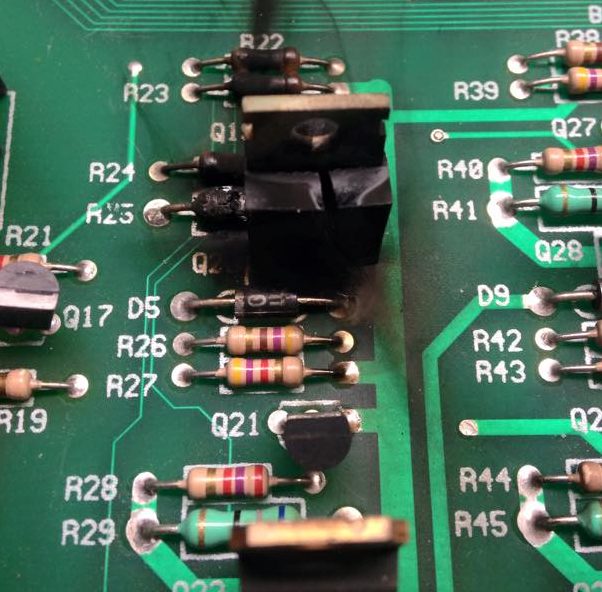
J122 carries two shared diode tieback groups, not one. The four loads on J122 (SOL 25 Thing Motor Q26, SOL 26 Thing Eject Hole Q24, SOL 27 Bookcase Motor Q22, SOL 28 Swamp Release Q20, all on fuse F103) have their flyback diodes tied back to the board in pairs:
Tieback wire J122 pins Shared by Grey-Yellow 5 and 8 SOL 25 Thing Motor (Q26) and SOL 27 Bookcase Motor (Q22) Violet-Green 6 and 9 SOL 26 Thing Eject Hole (Q24) and SOL 28 Swamp Release (Q20) If a tieback wire, its IDC terminal, its solder joint at the load or the diode is open, the driver transistor takes the full flyback kick and dies; a dead transistor can leave that motor or coil locked on and cooking. The Violet-Green Swamp Release side is the well-known TAF failure, but inspect both groups after any work under the playfield. Continuity test, game off, J122 unplugged: from the J122 pin to the supply-side lug at the load along the tieback wire itself reads close to 0 Ω. A path that runs through a coil or motor winding reads several ohms, and that is the winding, not a bad tieback. Look at the J122 housing, the IDC terminals, the header pins and the board solder for browning, looseness or cracks; a doubtful IDC terminal is replaced with a crimped Trifurcon terminal, A7 Connectors and cleaning. After any repair here, run the solenoid test on all four loads before the glass goes back. The photo below shows what a lost tieback does to the transistor.
The three Power magnets run through the High Power board A-15139 under the playfield: Q44 for the left magnet on J127-9 (fuse F104), Q34 and Q32 for the upper and right magnets on J126-7 and J126-8 (fuse F111). The 20-9247 coil has a thermistor in it; a magnet that works when cold and fades after a long game is that thermistor doing its job, not a fault. The solenoid wiring diagram (Operations Manual p. 3-9) draws the High Power board on the J107 side; it is really fed from J126 (upper and right magnets) and J127 (left magnet), and its 50 V comes from the Extra Flipper Supply board's J903, see A6 Flippers. A magnet transistor that shorts on leaves the magnet energised and burns the playfield under it, so the fuses on F104 and F111 must be the listed values, never larger. The coil cards show the 5A S.B. fuse that the solenoid table's footnote puts under the playfield instead; which one feeds the magnets is an open question in Verify.
The Thing Magnet (SOL 06) is a different coil, A-12158-1 on J130-7 through Q66, fuse F105.
The motors (SOL 25 Thing Motor, SOL 27 Bookcase Motor) are on the flasher group with fuse F103. Test them in the solenoid test and listen; a motor that hums without turning has a jammed gear train, not an electrical fault.
Sources
- Vendor listings for AE-26-1200 (10.5–10.8 Ω) and 20-9247 (4.3–4.6 Ω, 650 turns, thermistor) — solid. https://www.actionpinball.com/parts.php?item=AE-26-1200 , https://www.pinballlife.com/williamsbally-magnet-coil-20-9247.html , https://www.marcospecialties.com/pinball-parts/20-9247
- Pinside, coil substitution guidelines and AE-23-800 thread; coil chart values for AE-26-1500, AE-27-1200, AE-30-2000 — forum. https://pinside.com/pinball/forum/topic/guidelines-for-coil-substitution , https://pinside.com/pinball/forum/topic/use-ae-23-800-instead-of-ae-26-1200
- Marco Specialties, A-12158-1 is the Thing magnet assembly — solid; 68 Ω from one owner — forum. https://www.marcospecialties.com/pinball-parts/A-12158-1
- homepinballrepair.com, testing solenoid coils, diodes and WPC solenoid drivers — solid. https://homepinballrepair.com/testing-solenoid-coils/ , https://homepinballrepair.com/wpc-solenoid-troubleshooting/ , https://homepinballrepair.com/pinball-solenoid-stays-locked-on/
- The Operations Manual's solenoid table and wiring for J122 (this app's own data: pins 1–4, Q26/Q24/Q22/Q20, F103) — solid. Operations Manual p. 3-17, Solenoid Circuits: Grey-Yellow tieback diode for SOL 25 and SOL 27 on J122-5 and 8, Violet-Green tieback diode for SOL 26 and SOL 28 on J122-6 and 9 — solid, confirmed on the schematic.
- PinWiki, The Addams Family: Q20 tieback diode and the Q20 photo, magnet transistors Q44/Q32/Q34 and the J126/J127 correction to the manual, Extra Flipper Supply board — solid. Photos from PinWiki, shown with permission; the rights remain with PinWiki and the photographers. https://www.pinwiki.com/wiki/index.php/The_Addams_Family
A3 Switches and optos
A switch's component page in this app gives the column and row, the wire colours, the CPU board pins (J206 for columns, J208 for rows) and the IC pin (U20 for columns, U18 or U19 for rows).
How the matrix works, in one paragraph
The CPU strobes the eight columns one at a time through U20, a ULN2803 driver. The CPU board parts list (A-12742-2001) shows sockets only for the 40-pin CPU, the 32-pin game ROM and the 84-pin ASIC, so on an original board U20 is soldered in; fit a socket when it is replaced. Each row sits high, about 12 V through a pull-up, and is read by an LM339 comparator at U18 or U19. When a switch closes, its column strobe reaches its row through the switch and the small diode on the switch, and the row goes low for that column's moment. The diode is what keeps a closed switch from back-feeding other columns; that is why a bad diode shows up as other switches, not as this one.
Symptom first
| What T.1 Switch Edges shows | Where to look |
|---|---|
| One switch dead | The switch itself: gap, dirt, the diode open, a wire off at the lug |
| One switch stuck closed | Bent blade, ball resting on it, or a shorted diode on that switch |
| A whole column or a whole row reads closed, or several switches fire when one is pressed | A shorted diode somewhere on that column or row, a pinched harness, or U20 / the row comparator |
| A whole column dead | U20 (the column driver) or J206 pin |
| A whole row dead | U18/U19 input or J208 pin |
| Switches fire at random after work under the playfield | A wire pulled off a lug or a diode leg snapped |
With the meter, game off
- The switch: continuity across the blades, pressed and released. A leaf switch wants a 1/16-inch (1.6 mm) gap. Clean the contacts by closing them on a clean business card and pulling it through; never file them.
- The diode: diode setting across it. 0.4–0.7 V one way, OL the other. Low both ways is shorted; OL both ways is open. Direction and banding as drawn on the switch pages.
- Finding the shorted diode on a column: unplug J206 and J208 so the board is out of it, then measure each diode on that column one by one. PinWiki describes a quicker adapter trick that swaps the column and row cables so the switch test shows only the bad one.
- The wire: continuity from the switch lug to the pin at J206 or J208. The pin numbers are on the switch's component page.
With the game on
Rows and columns are pulsed, so a meter gives an average, not a level. Use T.1 with a ball for rollovers, a finger for targets and a card through the optos. If you own a logic probe, columns should pulse and rows should pulse only while a switch in them is closed.
Optos
TAF has a 7-Opto board (A-14977) and a 4-Opto board (A-15017). Each opto is an infrared LED facing a phototransistor.
- The LED side runs from 12 V through a series resistor. The parts list for the 2-opto switch assembly (Operations Manual p. 2-13) reads 470 Ω, 1/2 W, as far as the manual page is legible; the 7-opto board's values are not readable on the manual page, so read the resistor on the board. The resistor runs warm; that is normal.
- Phone test: point a phone camera at the emitter with the game on. Most front cameras show infrared as a faint purple glow, so you can see at once whether the emitter is lit. A rear camera often has an infrared filter and shows nothing.
- Receiver test: DC volts on the receiver's output at the opto board with the beam open and with a card in it. It must swing between near 0 and near 12 V. No swing with a lit emitter is a dead phototransistor or the LM339 on the opto board.
- Check the 12 V at the opto board connector before condemning anything.
Fliptronics switches
F1–F8 (the four end-of-stroke switches and the four flipper buttons) do not go through U20. They are read by the Fliptronics board: the end-of-stroke switches on its J806 table, the buttons on J805. The buttons are stacked pairs of leaf switches behind the cabinet buttons (assembly B-12273-6), not optos. See A6 Flippers.
This machine's own traps
- Centre ramp shots award Millions Plus instead of Bear Kicks. Both ramps award something on exit, and the game tells the two apart by which switch closed just before the shared exit switch. The switch near the top-left of the centre ramp (the manual calls the centre ramp the Right Ramp, so that is switch 65, Right Ramp Top; the shared one is switch 58, Right Ramp Exit) must close first. On one game the microswitch was worn out and was replaced; on another a small bend to the actuator made the shot register. Confirm in T.1 which switches a slow ball on the ramp actually closes before you bend anything.
What kills U20
A solenoid, flasher, GI or lamp wire touching a switch wire puts 18–70 V into a column. U20 dies first and usually alone; the LM339 row comparators often survive. Replace U20, then find the wire that touched, or it happens again. If an LM339 must go, socket the replacement: the pads lift easily.
Sources
- Operations Manual, CPU board parts list A-12742-2001 (sockets) and p. 2-13, 2-opto switch assembly (470 Ω resistor) — solid, from the manual page.
- PinWiki, Williams WPC: matrix architecture, U20/U18/U19, opto board values, phone camera test — solid. PinWiki says U20 is socketed on some boards; the Operations Manual's parts list says not. https://www.pinwiki.com/wiki/index.php?title=Williams_WPC
- PinWiki, The Addams Family: the Bear Kicks ramp switch — solid, two owners' repairs, reworded; the switch numbers are this app's reading of it. https://www.pinwiki.com/wiki/index.php/The_Addams_Family
- PinWiki, Leon Borre WPC shorted switch diode: symptoms and the adapter method — solid. https://pinwiki.com/wiki/index.php?title=Leon_Borre_WPC_Shorted_Switch_Diode
- Operations Manual p. 1-48 for contact cleaning and the 1/16-inch gap: [Maintenance Information](#find:Maintenance Information).
- Operations Manual, cabinet parts list: button assembly B-12273-6 with a stacked pair of blade switches, and the Fliptronics J805 and J806 tables — solid, from the manual page; the wiring is in A6 Flippers.
A4 Lamps, flashers and GI
Three different circuits light this machine and they fail differently. A lamp's component page in this app gives the matrix column and row with their transistor and pin; a flasher's component page covers the flasher; the GI table on Solenoids and flashers gives the five strings.
The lamp matrix, 18 V DC
Eight columns from J137 through Q98–Q91, eight rows from J133 through Q90–Q83, driven in turn 8 times a cycle. The bulbs are #555 wedge in the inserts and jets (part 24-8768).
| What T.10 Lamp Test shows | Where to look |
|---|---|
| One lamp out | Bulb, then socket. Swap in a known-good bulb; then ohms across the socket contacts with the bulb in, game off |
| One lamp dim or flickers | Socket contacts tarnished or the wedge base loose; bend the socket contacts in slightly |
| A whole column out | The column transistor on the lamp's component page (Q9x) or its J137 pin |
| A whole row out | The row transistor (Q8x) or its J133 pin |
| A column or row stuck fully on | That transistor shorted |
| Odd lamps glow faintly | Ghosting, see LEDs below |
With the meter, game off, diode setting on the transistor as in A2 Coils, magnets and motors. With the game on and the test on "all lamps", DC volts at a socket shows a pulsed average, a few volts; it is the comparison between a working socket and a dead one that tells you something, not the number. For a dead column or row the clean test is a known-good #555 pushed straight into the column pin and row pin at the board with the harness unplugged: if it lights, the board is fine and the fault is in the harness or sockets.
LEDs and ghosting
The LED kit replaces the #555 and #44 bulbs. Two things follow:
- Ghosting: WPC-89 lamp timing leaks a little current into the next column, invisible on a filament, a faint glow on an LED. Non-ghosting LEDs hide it, and there is a ghost-busting patch for the TAF ROM that fixes the timing. If lamps glow that should be off after the kit, that is the cause, not a fault.
- GI flicker when dimmed: the GI is dimmed by triacs chopping the AC. LEDs show that as flicker. Machine setup step 3, Standard adjustments, sets A.1 25 Allow Dim Illumination to NO for that reason.
Flashers, 20 V DC
The #906 wedge flashers (SOL 17–22) are driven as solenoids from the 20 V rail through the transistor on their component page, fuse F111 for the secondary group. Test them in the solenoid test, and if one is dead: bulb, socket, then the transistor exactly as a coil. A #906 and a #555 have the same base shape and are not interchangeable.
General illumination, 6.3 V AC
Five strings, all through J120 and J121 on the driver board, each with its own triac and fuse. The two playfield strings use #44 bayonet bulbs, the two insert strings #555.
| String | Pin | Triac | Fuse |
|---|---|---|---|
| GI 1 Left Playfield | J120-1 | Q18 | F110 |
| GI 2 Insert House | J120-2 | Q10 | F106 |
| GI 3 Insert People | J120-3 | Q14 | F107 |
| GI 4 not used | J121-5 | Q16 | F109 |
| GI 5 Right Playfield | J121-6 | Q12 | F108 |
- A whole string out: the fuse first, out of the holder. Then AC volts at the pin on J120/J121: about 6.3 V AC with the string on. Volts at the pin and no light means the harness or a bad socket; no volts means the triac or a burnt connector.
- The connectors: J115 (the 6.3 V AC feed from the transformer) and J120/J121 (the strings out) carry amps and brown with age. Browned, loose or melted pins are the single most common GI fault on WPC. Look, do not assume: discoloured housing or pins, weak terminal tension, a poor crimp, cracked solder at the header, heat marks on the board around it. If there is heat damage, replace both sides, terminals and header. If it is clean and tight, leave it alone. The decision tree is in A7 Connectors and cleaning.
- Half a string out: an open wire or a socket where the daisy-chain passes through; GI sockets are in series along the string's wire, so the break is between the last lit and the first dark bulb.
Sources
- homepinballrepair.com, lamp matrix theory and troubleshooting: 18 V, TIP107 columns, TIP102 rows, test bulb at the board — solid. https://homepinballrepair.com/pinball-lamp-matrix-theory-and-troubleshooting/
- Pin numbers, transistors and fuses for the GI strings are from this app's own component data, transcribed from the manual's GI table.
- Emmytech and Pinside on WPC ghosting and the TAF ghost-busting ROM — solid. https://www.emmytech.com/arcade/led_ghost_busting/ , https://pinside.com/pinball/forum/topic/wpc-ghosting-rom-fix-for-addams
- Pinside on burnt WPC-89 GI connectors — forum, but universal experience. https://pinside.com/pinball/forum/topic/help-troubleshooting-wpc-89-gi-self-inflicted-mistake
A5 Power driver board
Owner's notes on the WPC-89 power driver board, A-12697, left side of the backbox. Almost every "the game does something strange" fault starts with five minutes on its test points.
Test points, game on, black probe on TP5
| Test point | Printed | Healthy reading |
|---|---|---|
| TP2 | 5 V | 4.9–5.1 V DC, and it must not dip when the flippers fire |
| TP3 | 12 V | 12.0 V DC regulated |
| TP1 | 12 V | 14–15 V DC, unregulated, feeds the regulator |
| TP8 | 18 V | 17–19 V DC, lamp matrix |
| TP7 | 20 V | 22–25 V DC, flashers and the magnets' group (the magnets' supply is stated three ways, see Verify) |
| TP6 | 50 V | 70–75 V DC, solenoids and flippers. Yes, 70 |
A rail at zero: its fuse, then the bridge rectifier that makes it. A rail that is low: the bridge or the big filter capacitor next to it. The 5 V rail is the one that matters most, see resets.
Resets
The CPU board's watchdog resets the game the moment 5 V dips under about 4.65 V, even for a few milliseconds, typically when both flippers fire during multiball. The chain that makes 5 V is: transformer, bridge BR2, filter capacitor C5 (18 000 µF), the LM323K regulator on its heat sink, then the connectors to the CPU board.
- Watch TP2 while someone plays. If it sags with the flippers, keep going down this list.
- Bridge BR2, game off, diode setting on each of its four legs: 0.5–0.6 V forward, OL reverse. A bridge that has lost a tenth of a volt with age can pass this test and still be the cause; if everything else checks out, replace it.
- C5: it is usually blamed and often still fine. Replace it as one step, not as the fix.
- The LM323K and its heat sink: if the regulator runs very hot, the board is starving downstream. A drop-in switching regulator replacement runs cool and is a common upgrade.
- Connectors on the 5 V path to the CPU board: reseat, look for browned pins.
Bridge rectifiers in general
Four legs, two marked ~ (AC in), one + and one −. Diode setting, game off, ideally with the board's connectors off: from − to each ~ and from each ~ to + should read 0.5–0.6 V; the other direction OL. One leg shorted takes its fuse out at power-up; one leg open gives a rail at roughly half the voltage with a lot of hum in the lamps.
The batteries
This machine (observed 2026-09-24, photo): U8 carries an anyPin NVRAM Battery Eliminator and no batteries are fitted or needed. Confirm once that no old cells remain in or under the holder, and look at the board around it for leakage from before the swap. Settings survive without a battery; the clock only runs with the game on, so A.1 24 Show Date and Time is set to NO. The steps below describe the original arrangement.
Three AA cells in series on the CPU board, 4.5 V fresh. Measure across the pack with the game off; at the RAM (U8, pins 26–28) about 4.3 V is expected. Below about 4 V the settings will not survive a power cycle and the game boots with "Factory Settings Restored". Any white or green crust on the holder is a leak, and it is the first thing to check on the yearly round, because it keeps spreading under the solder mask. Contact cleaner does nothing for it.
- Look at the holder, the board around it, the component leads nearby and the copper: white or green crust, dark copper, eaten leads.
- Assume it goes further than you can see; look under the holder and at the traces and vias on both sides of the board.
- Neutralise the alkaline residue (household white vinegar on a swab), rinse with IPA, dry completely.
- Repair eaten traces, vias, sockets and component leads; the comparator and the reset circuit next to the holder are the usual victims.
- If the original holder is still on the board, consider a remote holder on a lead or an NVRAM module so a future leak lands nowhere near the board.
Machine setup step 7, Upgrades and upkeep, records the check.
A fuse that keeps blowing
Never fit a bigger fuse. Find the load with the [Fuse List](#find:Fuse List) and the fuse column on the solenoid pages, then:
- Unplug the connector for everything on that fuse. Power up. If the fuse holds, the fault is downstream, not on the board.
- Each coil on that fuse, on ohms, against its twin: A2 Coils, magnets and motors.
- Each coil diode, diode setting.
- The driver transistors for the group, connector still unplugged.
- For a lamp fuse, a shorted bulb or socket pulling the 18 V rail down; for a GI fuse, the triac and the J120/J121 pins: A4 Lamps, flashers and GI.
- If the fuse blows with everything unplugged, the bridge for that rail is shorted.
Sources
- homepinballrepair.com, Troubleshooting Williams/Bally WPC: test point table and real readings — solid. https://homepinballrepair.com/troubleshooting-williams-bally-wpc-pinball-machines/
- PinWiki, Leon Borre, sudden reset on WPC machines: watchdog threshold, BR2, C5 — solid. https://www.pinwiki.com/wiki/index.php/Leon_Borre_Sudden_reset_on_WPC_machines
- AF Pinball, WPC CPU battery corrosion repairs: 4.3 V at U8, corrosion reaching the comparator — solid. https://www.afpinball.com/p/williams-wpc-cpu-board-battery-corrosion-repairs-including-a-scratch-build
- homepinballrepair.com, transistors, diodes and rectifiers — solid. https://homepinballrepair.com/understanding-pinball-ss-transistors-diodes-rectifiers/
A6 Flippers
Owner's notes. TAF is a Fliptronics I game: the flippers are driven by the Fliptronics board at the top of the backbox, not by the switch matrix and not by the EOS switch directly. Four flippers, four coil types are not all the same.
The coils
Each flipper coil has two windings sharing one lug: a low-ohm power winding for the stroke and a high-ohm hold winding for keeping the flipper up. Measure from the common lug to each of the other two, game off, connector unplugged.
| Flipper | Coil | Power winding | Hold winding | Power from |
|---|---|---|---|---|
| Lower left, lower right | FL-15411 orange | 4.2 Ω | 145 Ω | Driver board, F101 / F102 |
| Upper right | FL-11630 red | 4.7 Ω | 160 Ω | Extra Flipper Supply board, F902 |
| Upper left (Thing Flips) | FL-11753 yellow | 9.8 Ω | 165 Ω | Extra Flipper Supply board, F901 |
- Power winding OL: no stroke at all, the flipper only creeps up on the hold winding.
- Hold winding OL: a strong stroke that drops straight back down.
- Either winding under 1 Ω or well below the table: shorted, fuse blows, replace the coil and test the transistor.
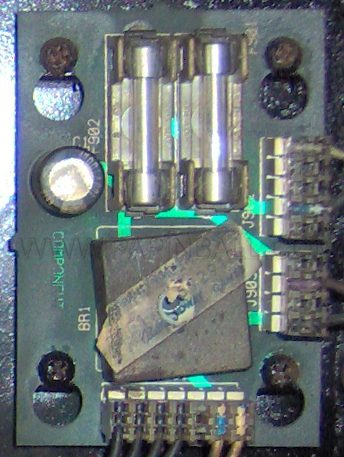
- The upper flippers and the three Power magnets get their 50 V (really 70 V) from the Extra Flipper Supply board A-15416, in the backbox just to the right of and above the driver board, photo below; the manual states the magnets' supply three ways, so Verify asks for the reading. If both upper flippers or all the magnets are dead, measure there first: J903 pins 1 and 2 carry the 50 V to the magnet board under the playfield, pins 3 and 4 are its ground. The manual's schematic for this board is wrong on both counts: J903 is drawn incorrectly and the bridge rectifier is rotated 90 degrees. Fuses F901 and F902 are on this board.
What the EOS does on this game
The end-of-stroke switch on a Fliptronics game is a normally open switch that closes when the flipper reaches the top. It carries no coil current. The board reads it (F1, F3, F5, F7 on the J806 table) and switches the coil from the power winding to the hold winding when it closes. If the ball knocks the flipper down, the EOS opens and the board gives the power winding another pulse.
- EOS never closes (dirty, gap too wide): the flipper still works, because the software falls back to a timer, but it drops under a hard ball hit and hold is weak.
- EOS stuck closed (bent, gap gone): the board thinks the flipper is already up, so it gives hold only: a lazy or dead flipper.
- Gap 0.062 inch (1.6 mm) at rest, closing just before the end of travel. Clean with a card, never file. The manual disagrees with itself on the EOS type: the parts list gives SW-1A-194 (make, normally open) for the lower flippers and SW-1A-193 for the upper ones, while the flipper assembly note on Operations Manual p. 2-16 describes contacts that open at end of stroke. Look at yours at rest: contacts apart means normally open. Verify asks which.
Weak or lazy flipper, in this order
- Rubber: hard or flat rubber shoots wide and dead.
- Sleeve: pull the plunger; a grey, gritty or scored sleeve is replaced, never lubricated. Some replacement sleeves are 1/8 inch short and let the plunger slop.
- Plunger and link: a mushroomed plunger tip or a worn link (the first parts round replaces these, A-10656 × 4).
- Coil stop: mushroomed or loose stop changes the stroke.
- Bushing: a worn flipper bushing lets the bat sit low and drag on the playfield.
- EOS: as above.
- Coil: the table above.
- Transistor: the Fliptronics board uses a TIP102 driving a TIP36C per winding. Test as in A2 Coils, magnets and motors, with the flipper connector unplugged. On this machine the whole TIP102 row carries date code 9910 while the TIP36C are original 9208, so the TIP102s were replaced together in 1999, probably after a flipper fault; look at those solder joints and pins when chasing F1 or F3 (observed 2026-09-24, photo).
- Connector pins: browned pins at the Fliptronics board or at the coil.
The buttons
The cabinet buttons on this game are leaf switches, not optos: the button assembly B-12273-6 in the cabinet parts list, with a stacked pair of blade switches behind each button. On the right side the lower pair is F2 (Blue-Violet, J805-1) and the upper pair F6 (Black-Yellow, J805-3); on the left F4 (Blue-Grey, J805-2) and F8 (Black-Blue, J805-5). All four share one switch ground, the orange wire on J805-6, so each button's connector carries three wires: two signals and the ground. A button that works only when pressed hard is a blade gap or dirty contacts, cleaned with card stock like any switch, see A3 Switches and optos. Both flippers dead on one side and the other side fine is nearly always that button's switch stack or its three-pin connector, not the coils. Opto flipper boards with a metal flag came on later WPC games; if one has been retrofitted here it needs 12 V and ground as well.
Tuning, in the order the wear happens
- The link first. With the playfield up, push the flipper link by hand and watch for play before the bat moves. A worn link is most of what a tune-up needs; the first parts round replaces all four (A-10656).
- Level. Sluggish flippers on a game that is off level are the level, not the flippers.
- Removing a flipper, when the sleeve, plunger, stop or bushing has to come out: loosen the bat clamp with a 3/8-inch wrench (a ratcheting one makes the clamp easy; an Allen key holds the shaft if it turns) and pull the bat out from the top. Take the socket-head screws out of the rear of the coil, lift off the stop, slide the coil off the mechanism. Two screws free the EOS switch. Eight screws hold the flipper plate to the playfield.
- A coil that will not slide off has distorted from heat and is replaced, not persuaded.
- The bushing: three screws into the plate with locknuts on the threads. Replace it if the bat sits low or rocks.
- New plungers: some replacement plungers have had loose roll pins that fall out after a few hundred games. Check the pin is tight before it goes in; a dab of thread-locking glue on it is cheap insurance.
- Then coil stop, plunger, link and clamp as needed, and the EOS if it looks tired.
The Fliptronics I board, and its successor
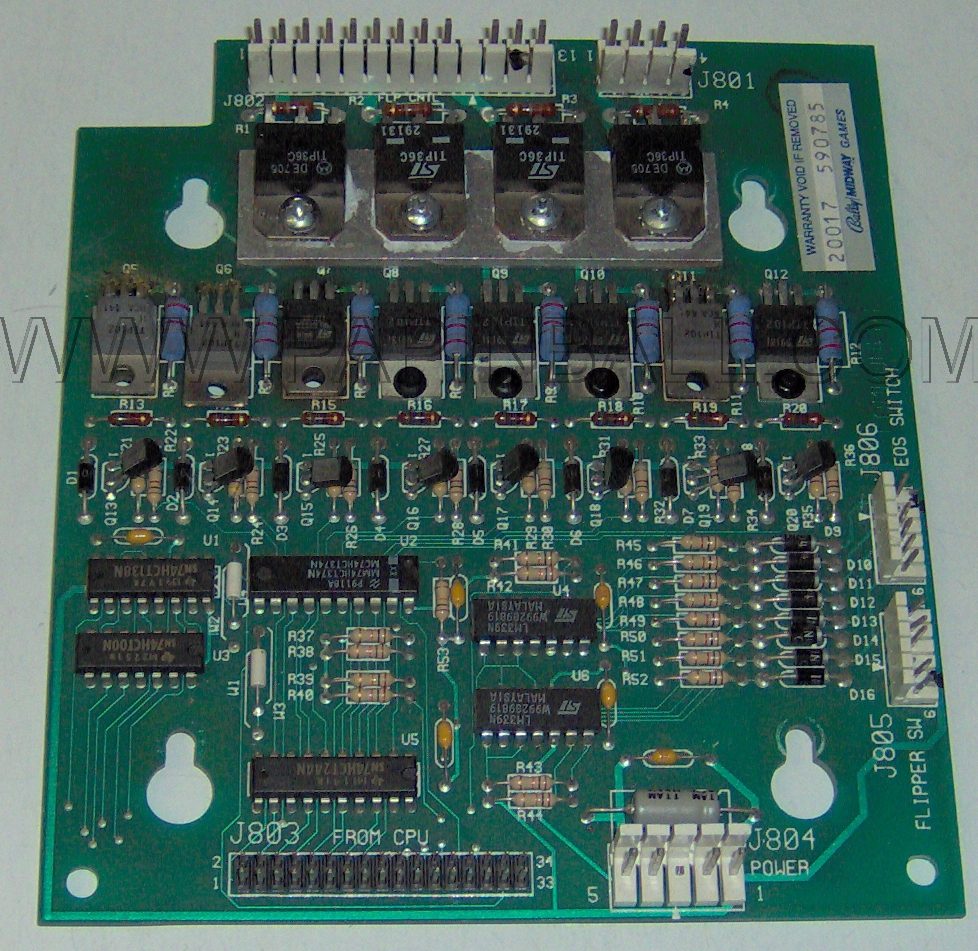
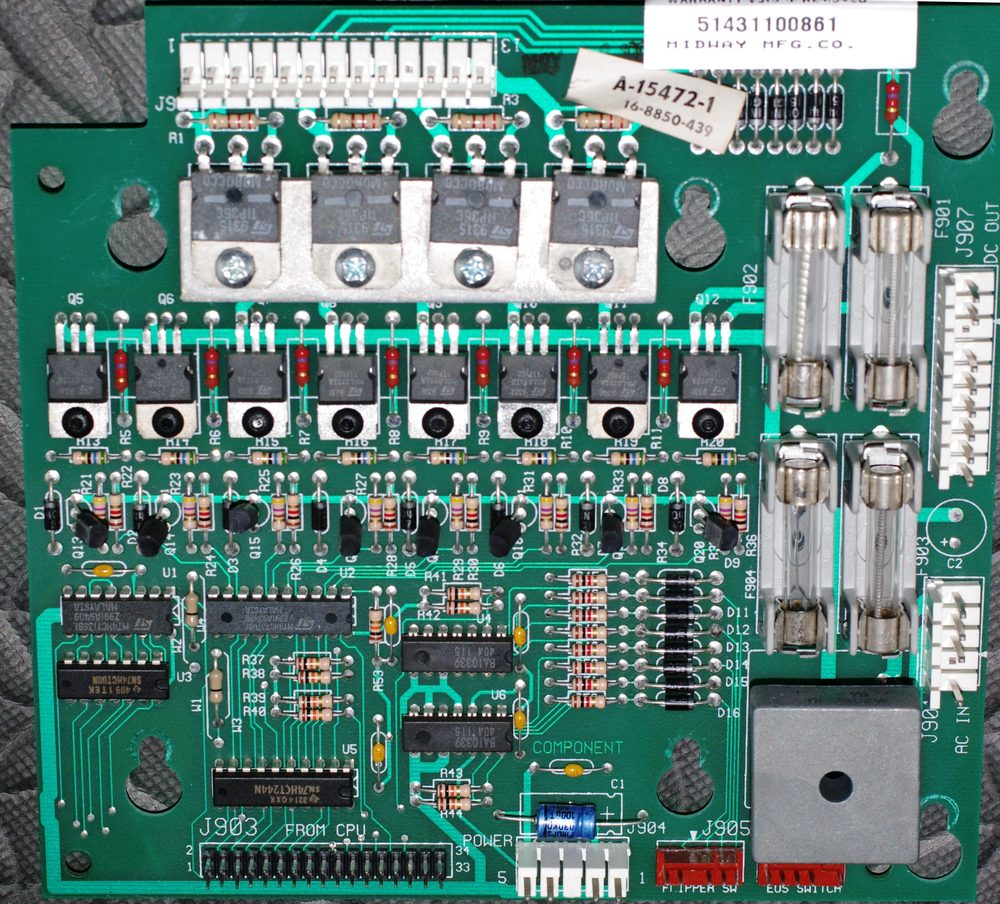
The Addams Family and Addams Family Gold are the only games with the Fliptronics I board (first photo below). It is repairable, and a Fliptronics II board (any of A-15472, A-15072-1, A-15472-1; second photo) drops onto the same mounting holes if it ever has to be replaced. The connector mapping, originally from M. McAndrew via Clay Harrel's WPC guide:
| Fliptronics II | Fliptronics I |
|---|---|
| J902 | J802 |
| J905 | J805 |
| J906 | J806 |
| J904 | J804 |
| J903 | J803 (ribbon cable) |
| J901, J907 | not used |
On the driver board, remove J111 and leave J109, J110 and J112 connected. On the Extra Flipper Supply board, J901, J902 and J903 stay as they are.
Never
No oil, grease or spray on plungers, sleeves, links or the EOS. A flipper that squeaks needs a new sleeve.
Sources
- Marco Specialties and Pinball Life coil listings: FL-15411 4.2/145 Ω, FL-11630 4.7/160 Ω, FL-11753 9.8/165 Ω — solid. https://www.marcospecialties.com/pinball-parts/FL-15411 , https://www.marcospecialties.com/pinball-parts/FL-11630 , https://www.pinballlife.com/williamsbally-fl-15411-flipper-coil.html
- Marco Specialties, EOS switches blog: Fliptronics reads a normally open EOS; TAF listed as N.O. — solid. https://www.marcospecialties.com/pinball-parts-blog/eos-switches
- PinWiki, Common Flipper Troubleshooting: the diagnostic order — solid. https://www.pinwiki.com/wiki/index.php?title=Common_Flipper_Troubleshooting
- PinWiki, The Addams Family: Extra Flipper Supply board location, J903 pins and the schematic errors, the Fliptronics I/II connector mapping, board photos — solid. Photos from PinWiki, shown with permission; the rights remain with PinWiki and the photographers. https://www.pinwiki.com/wiki/index.php/The_Addams_Family
- PinWiki, Fixing and Tuning WPC Flippers: link play test, removal order, distorted coils, loose roll pins — solid, but the page is marked unfinished. https://www.pinwiki.com/wiki/index.php/Fixing_and_Tuning_WPC_Flippers https://www.pinwiki.com/wiki/index.php/The_Addams_Family
- homepinballrepair.com, rebuilding WPC Fliptronics flippers: EOS cleaning — solid. https://homepinballrepair.com/rebuilding-wpc-fliptronics-flippers/
A7 Connectors and cleaning
Contact cleaner is not a repair tool. Most "clean the connector" advice on the internet skips the step that matters: looking at the connector and measuring it first. This page is the process the Care page's yearly round follows.
Cleaning is not repair
Eight different things get called "a bad contact". Only the first two are fixed with a spray.
| What it is | What fixes it |
|---|---|
| Dirt, dust, oil, old spray residue | Solvent: IPA or an electronics cleaner, then a contact treatment |
| Light oxidation on intact pins | DeoxIT D5 or Kontakt 60 PLUS |
| Browned, melted or darkened housing or pins (heat) | Replace both sides: new terminals in a new housing and a new header on the board |
| Loose terminal, weak spring tension, terminal that backs out | Replace the terminal, with a proper crimp tool |
| Poor crimp or a tired IDC connection | Replace with a crimped Trifurcon terminal; never squeeze a crimp with pliers |
| Cracked solder joint at a header or a lug | Reflow or resolder |
| Failed component (diode, transistor, coil, bulb) | Measure with A1 Multimeter basics and the component's page, then replace it |
| Battery leakage on the CPU board | Neutralise, clean, repair traces: A5 Power driver board. A spray does nothing here |
The decision for every connector
Power off. Pull the connector and look at both sides in good light.
- Clean and reuse when it is mechanically intact, not heat-marked, not badly corroded, the terminals grip the pins, and it is merely dirty or dull. Clean if needed, treat with D5 or Kontakt 60 PLUS, push it back, then check that the circuit works.
- Clean, then a precise treatment when the contact is accessible and already clean: a very small amount of DeoxIT D100L, wipe off the excess so only a thin film remains.
- Replace when it is burnt, browned, melted, badly oxidised, the terminals are loose, the crimp or IDC is unreliable, the header pins are damaged, or the circuit still measures a voltage drop across the connector after cleaning. Replace the terminal and, when the pins are marked, the header too.
Do not replace a connector only because the machine is old. Do not clean a burnt connector and call the job done.
Products, and what each one is for
| Product | Use | Do not |
|---|---|---|
| DeoxIT D5 (5 % DeoxIT in 75 % mineral spirits and 20 % propellant, per CAIG) | Intact connectors that are dirty or lightly oxidised: it flushes, deoxidises and leaves a thin protective film | Fog whole boards, switches, optos or plastics with it |
| Kontakt Chemie 60 PLUS | The European one-can equivalent of D5: its maker says it removes oxides and sulphides and leaves a protective film that reduces friction and wear | Confuse it with plain Kontakt 60 |
| Plain Kontakt 60 | The aggressive first step of the three-product system Kontakt 60, then Kontakt WL, then Kontakt 61 | Use it alone; the maker's own instruction is to rinse with Kontakt WL and protect with Kontakt 61 |
| DeoxIT D100L (100 % active) | Precise application on contacts that are already clean, where overspray is unwanted | Use it as a cleaner; it does not flush |
| High-purity IPA / residue-free electronics cleaner | Dirt, oil, grease, flux, and anywhere no film is wanted | Expect it to deoxidise or protect; it only cleans |
| WD-40, 5-56, oil, grease | Nothing in this machine | Ever, on contacts, switches, plungers or sleeves |
One flushing product (D5 or 60 PLUS), one precise product (D100L) and IPA is the whole chemical kit. The rest of the kit is what actually repairs things: a multimeter, a proper crimp tool, phosphor-bronze Trifurcon terminals (.156 for the driver board connectors, .100 for the CPU board), a few connector housings and headers, card stock for switches, and a soldering iron fit for board work.
Switches are not connectors
The leaf switches, the Fliptronics end-of-stroke switches and the optos are low-current gold contacts. They never see a spray. Close the contacts on clean card stock and pull it through; IPA on the card if something sticky is on them. No files, no abrasive paper, no burnishing. A pitted, misaligned or worn switch is adjusted or replaced, not cleaned. A switch that misbehaves gets a diagnosis first: gap, wire, solder at the lug, diode, connector, matrix, see A3 Switches and optos.
Symptoms are not causes
An intermittent switch, coil, lamp or motor is a reason to measure, not to spray. Before any chemical: connector continuity, terminal tension, solder joints, wire continuity, switch adjustment, switch diode, driver transistor, coil diode and tieback path, mechanical binding, the header pins on the board. The appendix page for that kind of part has the measurements.
The yearly round, in priority order
The order is by how expensive the failure is if missed, not by how often it happens. The Care page tracks each one.
- CPU board battery area: leakage spreads and eats traces. A5 Power driver board.
- J122 and both diode tieback groups: a lost tieback destroys a driver transistor and can leave a motor or coil locked on. A2 Coils, magnets and motors.
- GI connectors J115, J120, J121: the amps run through them and they brown. A4 Lamps, flashers and GI.
- Other high-current connectors: the solenoid connectors J122–J130, the flipper connectors, the power input, headers and solder joints.
- A look over every board: cracked solder, overheated components, corrosion, damaged traces, earlier repairs, tired connectors.
- Switches: clean and adjust only the ones that fail T.1 or feel wrong.
- Everything else: clean and treat where the inspection justified it.
After any work on a tieback, a burnt connector or a battery repair, check electrically before the glass goes back on: the solenoid test for the loads, the test points for the rails, T.1 for the switches.
Sources
- Owner's service brief (September 2026) on maintenance philosophy, product roles, the connector decision tree and the priority order — owner's notes, cross-checked against the sources below.
- CAIG, DeoxIT D5S-6 product page: 5 % active ingredient, 75 % mineral spirits, 20 % propellant, flushing action — vendor, confirmed. https://caig.com/product/deoxit-d5s-6-lmh/ D100L is the 100 % liquid in the same series. https://caig.com/deoxit-d-series/
- Kontakt Chemie (CRC Industries) product pages: Kontakt 60 dissolves oxides and is to be rinsed with Kontakt WL and protected with Kontakt 61; Kontakt 60 PLUS removes oxides and sulphides and leaves a protective film in one step — vendor, confirmed. https://other.crcindustries.eu/en/product/koc-kontakt-60-12x200ml/ , https://other.crcindustries.eu/en/product/koc-kontakt-60-plus-12x200ml/ , https://other.crcindustries.eu/en/product/koc-kontakt-wl-12x200ml/ , https://other.crcindustries.eu/en/product/koc-kontakt-61-12x200ml/
- PinWiki, Williams WPC, connector repair and Trifurcon terminals — solid. https://www.pinwiki.com/wiki/index.php?title=Williams_WPC
- Operations Manual p. 1-48, switch contact cleaning: [Maintenance Information](#find:Maintenance Information).
A8 Shopping out the playfield
After Lou Perazzoli's 2002 shop-out walkthrough on PinWiki, reworded and tied to the names this app uses. A shop-out is the full strip: every plastic, ramp, post and guide off, so the playfield, the inserts and the corners can be cleaned and waxed properly. For an office machine that is once every few years, or the day the LED kit goes in, since the plastics come off for that anyway. The monthly and half-yearly rounds on the Care page cover everything short of this.
Before the first screw
- A paper cup per assembly, named with a marker: slingshot plastics, swamp plastics, and so on. Screws and nuts go in the cup, or better, back into the part they came out of.
- A photo of every step before it comes apart. Label every connector you unplug with a letter.
- A white towel on the cabinet floor catches dropped screws.
- The three balls out first.
- Cleaning products are the Care page's: Novus 1 on the playfield and plastics, carnauba wax, nothing with ammonia or petroleum on the clear coat or the plastics. The original guide reaches for glass cleaner on the inserts; a dry brush first, then a barely damp cloth, does the same without the risk.
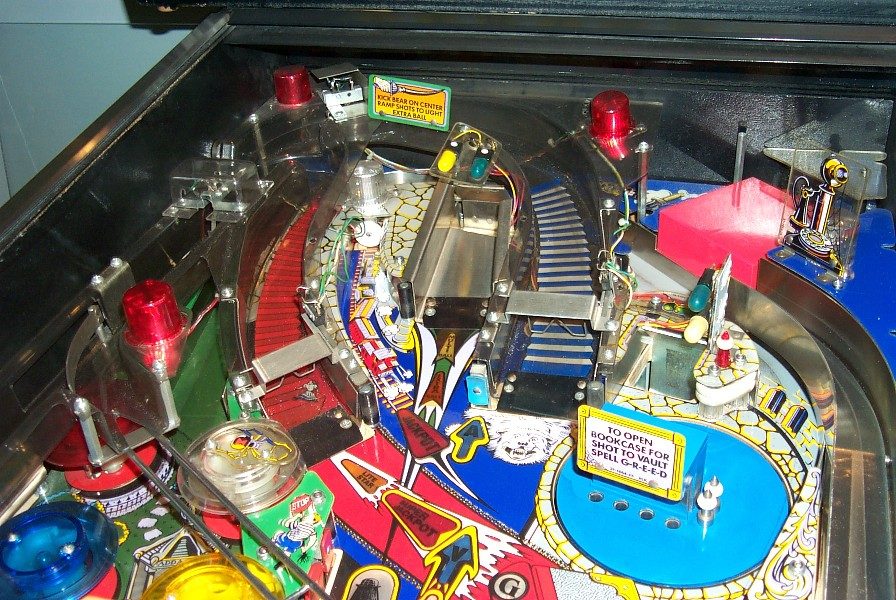
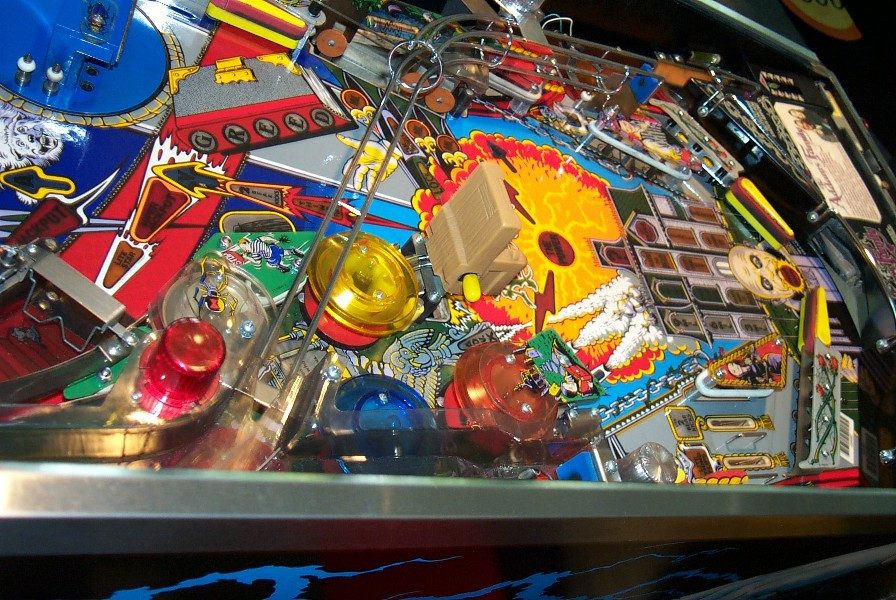
Order of removal
- Playfield up. Unplug every wire that runs through a hole to the top side (ramp flashers, ramp optos, the Thing box) and check each one can come up through its hole freely.
- Slingshot plastics. There is a washer on top of the ramp bracket.
- The wire ramp. Its wires only come up after the swamp plastics are off.
- The swamp plastics and the ones below them come off as one linked piece; no need to separate them. Double rubber rings under these plastics.
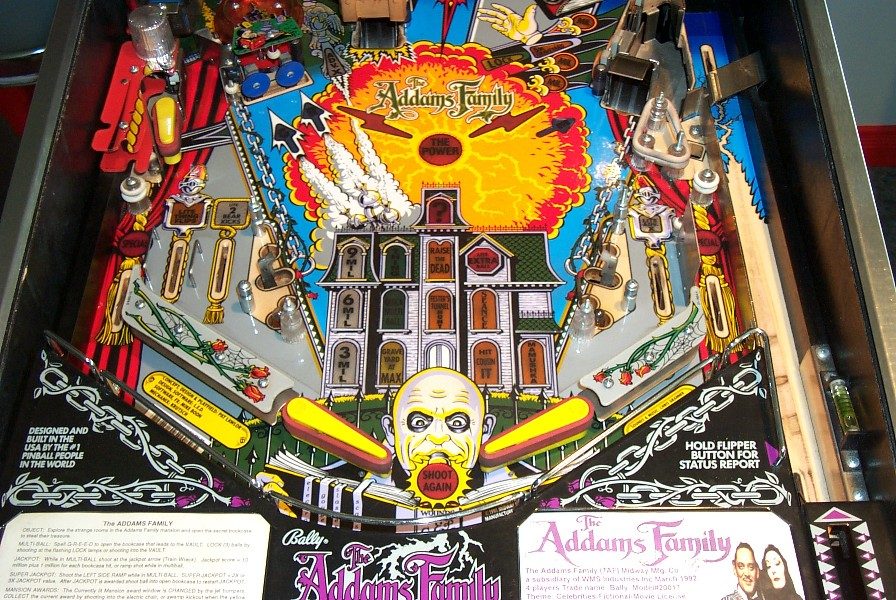
- The plastics by the lower flippers, then the outlane star posts: double rings on a 1-3/4-inch bolt. Under the red plastic with the braid are three star posts with double rings: the top one a 2-inch post with 5/16 inch showing above the nut, the left one a 1-3/4-inch pan-head screw, the bottom right a 2-3/8-inch post with 5/8 inch of screw showing for the ramp.
- The electric chair: bulbs out, then lift it straight up.
- The rose, amber and clear jet bumper caps. The red and blue ones wait until the bear kick ramp is off.
- The STOP-sign plastic by Thing, then the star posts under it: the lower a 2-inch post with 5/16 inch showing, the upper a 1-3/4-inch pan-head screw.
- The plastic over the Thing Flips flipper.
- The bear kick ramp. It can be done with the playfield in its hanger, but it is much easier with the playfield lifted out: stand it at about 60 degrees, lift straight up (it is heavy, take two people), set the hanger bracket on top of its post, put a towel on the front rails and lower the playfield pulled about 4 inches out of the cabinet. Left in the hanger, you need a stubby Phillips for the ramp screws, the ball guides are awkward, and the Thing box in the rear corner is out of reach.
- The red and blue jet caps, then the plastics under the bear kick ramp. The long green plastic on the left has three washers on the posts under it. The acid-bottle plastic has a 2-inch bolt on its right side with a washer on top of the plastic. Both star posts by the vault are 2-inch posts with 5/16 inch showing.
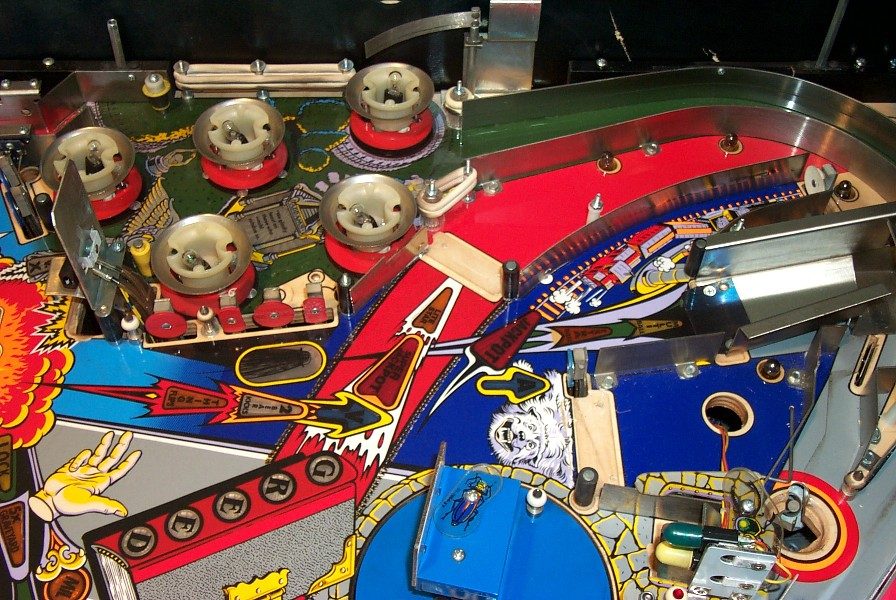
- The bookcase sign: two screws on top.
- The ball guides. Some have nuts underneath. Easiest: take everything off the far back of the playfield, then put the playfield back in its hanger so it can be raised and lowered without worry.
- The Thing box: playfield up, the metal cover off (two screws at the top, slide it back; the edges are sharp), then lift the plastic box straight up. The hand comes off its mechanism with two screws.
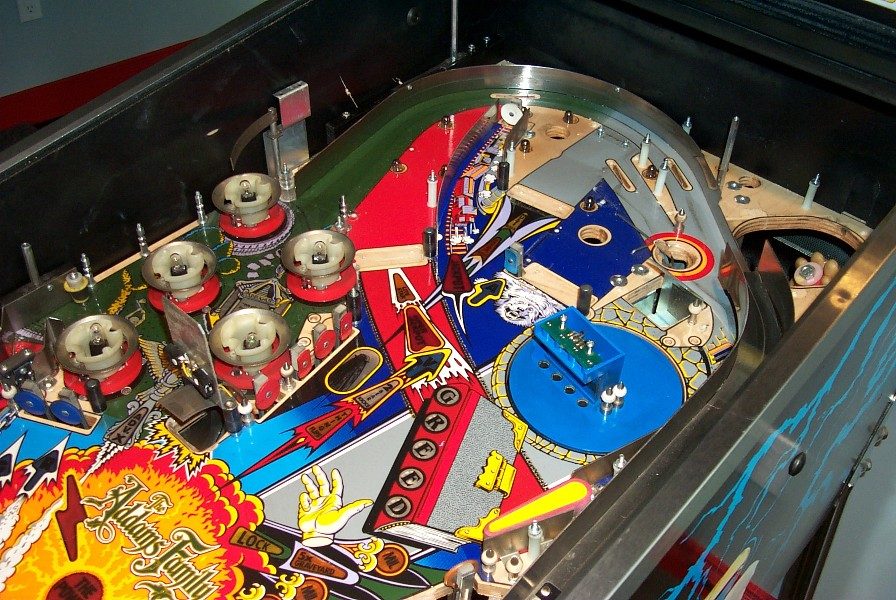
- The rear ball guides, so the corners can be cleaned.
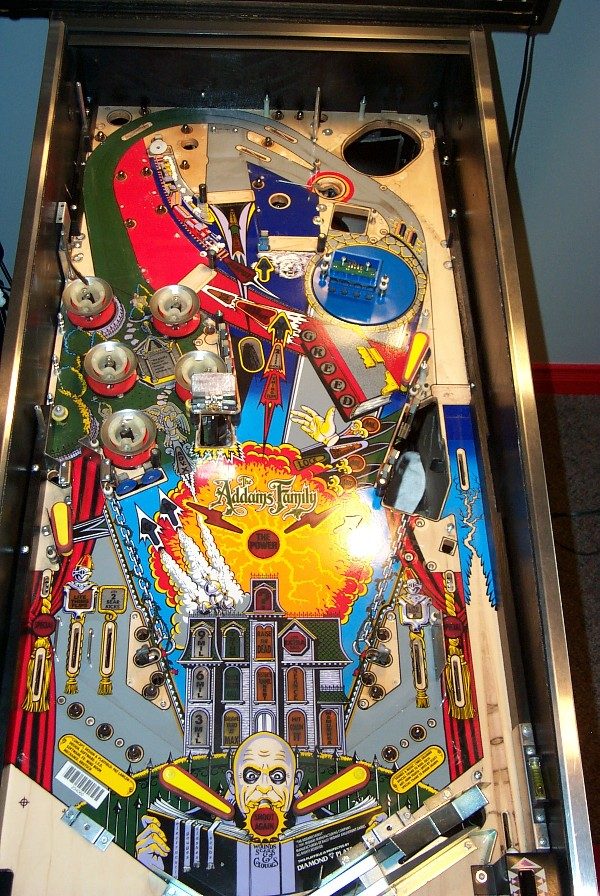
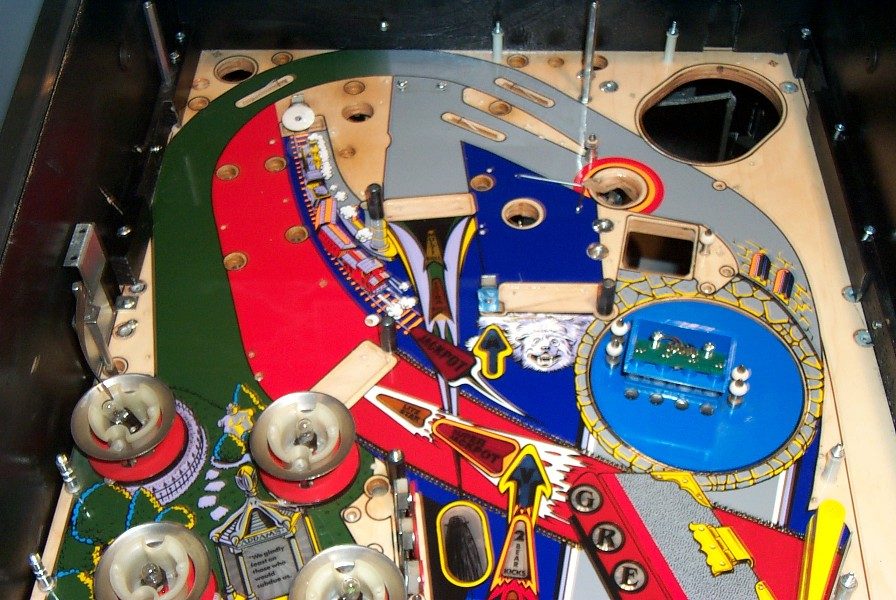
- Under the playfield: the ball trough out, and its switch off the plastic trough so the trough can be cleaned properly. The lamp boards and plastics that hold bulbs off, to reach the inserts from below. Inserts: dry brush first for the loose dirt, then damp.
Going back together
- Reverse order. The plastic with the telephone on it is the hard one: put the rear screw in, slide the lower plastic under it, and reach the front screw between the plastics with a thin magnetic Phillips; the ball guides block a normal one.
- Once every bulb is in and before the plastics go on, run T.10 Lamp Test. Finding a dead lamp in the back corner after everything is back is the worst outcome of a shop-out.
- Before the glass: T.1 Switch Edges with a ball, then the solenoid test, then a game.
Sources
- PinWiki, The Addams Family Shop Guide, Lou Perazzoli, 16 April 2002 — solid, one owner's walkthrough with post and screw lengths, reworded here. Photos shown with permission; the rights remain with PinWiki and the photographer. https://www.pinwiki.com/wiki/index.php/The_Addams_Family_Shop_Guide
- Care page for the cleaning products: A7 Connectors and cleaning for contacts, the Care page for surfaces.